Make Copilot answer from,
your data, not the open web.
We integrate Copilot, Azure AI and Microsoft Graph into your Microsoft 365 stack — grounded on your own SharePoint, Teams and business data, governed from day one. We start with what you already license, then build only what’s missing. Senior teams, fixed scope, AI your team actually trusts.
180+ teams shipping with our engineers · ISO 27001-secure · NDA on request
— What we build
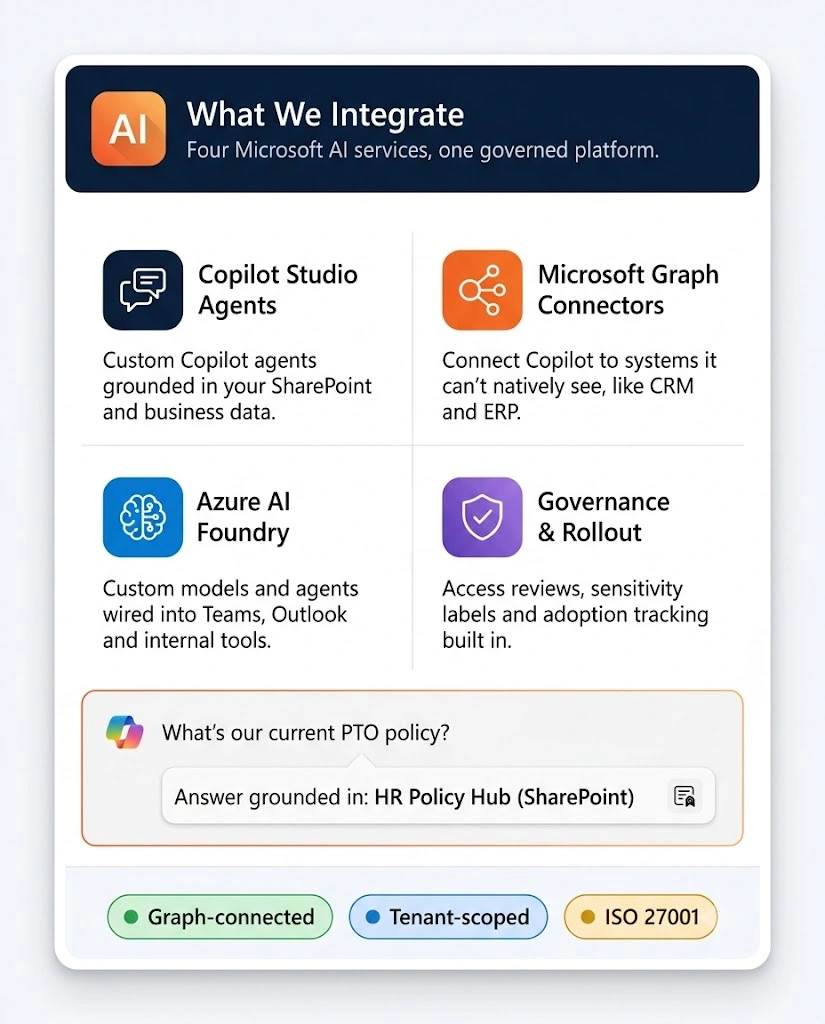
Four ways we build Microsoft AI integrations.
From a grounded Copilot agent to a custom Azure AI workflow wired into Teams, we build directly on the Microsoft stack you already run. (Need a non-Microsoft AI integration, a custom agent outside M365, or a broader SharePoint/Teams build? That’s AI Integration, AI Agents Development, and SharePoint/Teams pages.)
Copilot Studio agents
Custom Copilot agents grounded in your SharePoint, files and business data — not the open web.
Copilot Studio
Grounding
Custom agents
Governance
Microsoft Graph AI connectors
Graph connectors and plugins that let Copilot search and reason over systems it can’t see natively.
Graph connectors
Plugins
Search index
CRM / ERP
Azure AI Foundry integrations
Custom models and agents built on Azure AI, wired into Teams, Outlook or your internal tools.
Azure AI Foundry
Azure OpenAI
Teams apps
Function calling
Copilot governance & rollout
Access reviews, sensitivity labels and adoption tracking so Copilot ships safely and gets used.
Sensitivity labels
DLP
Adoption tracking
Rollout plan
- Featured · Grounded, not generic
An ungrounded Copilot
answer, is worse than no answer.
Most “Copilot gave a wrong answer” problems trace back to bad permissions and missing grounding — not the model. Before we build anything custom, we fix what Copilot can see and cite — then build only the connector or agent that’s genuinely missing. Safer for you, less to govern, and far more likely to be trusted.
Permission review
Grounding-first
Build only the gap
Copilot
Graph
Azure AI
1
AUDIT
What Copilot can see, cite and access today
2
GROUND
Fix permissions, indexing and source content
3
BUILD
Custom Copilot agent or Graph connector for the gap
Outcome
We start with a grounding and permissions review — so Copilot answers from the right sources before it answers at all.
14 years · 290+ bots
Built to,
trusted, not just turned on.
300+
Products shipped to production
across 9 industries
14yrs
Years in business
founded 2012
95%
Engagement extension
clients renew or expand
ISO 27001
Audited data security
brief → first standup






Capabilities & stack
Boring tech that
ships on time.
We build with the modern Microsoft AI stack — Copilot Studio, Azure AI Foundry, Microsoft Graph — and connect whatever else your business runs on. Real engineering, on the platform you already license.
How we pick
01
Ground before you generate
Before we build a custom agent, we fix what Copilot can already see, index and cite. A grounded answer from existing content beats a clever new build.
02
Build for trust, not novelty
An AI answer nobody double-checks is a liability. We build so every answer can be traced to a source, and we measure whether people actually rely on it.
03
Governed, not open-ended
Access scopes, sensitivity labels and audit logging from the start, so Copilot doesn’t surface what it shouldn’t.
04
Real engineering where it counts
Copilot Studio, Graph connectors and Azure AI Foundry when out-of-the-box Copilot runs out of road — proper engineering, not a fragile prompt hack.
COPILOT & AGENTS
Microsoft 365 Copilot
Copilot Studio
Copilot agents
Declarative agents
Gemini 2.5 Pro
Llama 3.1 / 3.3
Mistral Large
DeepSeek-V3
Qwen 2.5
Phi-4
AZURE AI
Azure AI Foundry
Azure OpenAI Service
Prompt flow
Model fine-tuning
GRAPH & DATA
Microsoft Graph
Graph connectors
SharePoint index
Semantic Index for Copilot
IDENTITY & GOVERNANCE
Entra ID SSO
Sensitivity labels
DLP
Purview audit & compliance
INTEGRATION & DEPLOYMENT
Teams apps
Power Automate
Azure Functions
REST APIs
CI/CD pipelines
Industries
Microsoft AI, tuned for
your industry.
Every domain has its own data sensitivity, documents and frontline questions. We bring playbooks, not generic prompts — and ground Copilot in your content from day one.
Healthcare
Finance & Fintech
Retail & E-commerce
Engagement models
Pick how you want to
ship with us.
Three ways in — all senior teams, all fixed against the outcome we agree before the first agent goes live.
Fixed-scope
Copilot readiness audit
Best when you’ve turned on Copilot but don’t trust its answers yet.
- Fixed scope, fixed price, fixed timeline
- We review grounding, permissions and access scopes
- A fix-vs-build roadmap with clear priorities
Most popular
Fixed-scope
Project-based build
Best for a defined Copilot agent, Graph connector or Azure AI integration.
- Dedicated chatbot squad
- Fixed scope, fixed price — no hourly drift
- Built, governed and rolled out with training
- Documentation your team can maintain
Embedded
Staff augmentation
Plug senior Copilot, Graph and Azure AI engineers into your team.
- 8+ yr average, hand-picked, never on a bench
- Copilot Studio, Graph and Azure AI Foundry skills, not prompt-only
- Direct line to your IT or digital workplace lead
FAQ
The questions
everyone asks before kickoff.
Still curious? Ask Zia in the hero chat — or book a 30-min strategy call with a senior engineer.
What can you build with Microsoft AI integration?
Custom Copilot Studio agents grounded in your SharePoint and business data, Microsoft Graph connectors that let Copilot see systems it can’t natively reach, Azure AI Foundry integrations wired into Teams or Outlook, and governance so it all ships safely. In short: AI that answers from your content, not the open web.
We turned on Copilot but it gives vague or wrong answers — can you fix that?
Usually yes, without a rebuild. Most weak Copilot answers trace back to permissions and indexing gaps, not the model — so we start with a grounding audit and fix what Copilot can see and cite before recommending anything custom.
What's the difference between Copilot, Azure AI and Microsoft Graph?
Copilot is the assistant your team interacts with day-to-day; Azure AI (Foundry, OpenAI Service) is the underlying model platform for custom builds; Microsoft Graph is the data-connection layer that lets AI see your SharePoint, Teams and mail content. We work across all three, matched to what the task actually needs.
Do you only work within Microsoft 365, or can you integrate AI with our other systems too?
This page covers AI built on the Microsoft stack — Copilot, Azure AI and Graph. If you need AI integrated with non-Microsoft systems or APIs, see our AI Integration (APIs, Apps, Systems) page — we build both, organized by what you need.
Can you build a custom Copilot agent, or only configure out-of-the-box Copilot?
Both. We start with what out-of-the-box Copilot and Graph connectors can already do, and build custom Copilot Studio agents or Azure AI integrations only where the native product genuinely falls short.
How do you measure success?
Access scopes, sensitivity labels and permission structures are set up before Copilot goes live, so it only ever surfaces what the person asking is already allowed to see. Governance is part of the build, not an afterthought.
Can you connect Copilot to our CRM, ERP or other business systems?
Yes, through Microsoft Graph connectors and custom plugins — so Copilot can search and reason over systems outside SharePoint and Teams, with single sign-on through Entra ID.
Who owns it, and can our team maintain it after handover?
You own it. We build with governance and source control, and hand over documentation your team (or the next vendor) can pick up — no black box, no lock-in.
Healthcare · HIPAA-ready since 2012
Let's make Copilot worth trusting.
Send your brief — a senior engineer (not a sales rep) replies within 24 hours with a scoped plan, model recommendation and a fixed timeline.
- A 30-min scoping call with a senior engineer
- A read on what's ungrounded vs what's missing in your current Copilot setup
- A fix-vs-build plan for the gap
- A rollout and governance plan — yours to keep