Moodle AI Chatbot Development & Integration Services
Give your learners an AI tutor that answers from your own course content, shows its sources, respects Moodle roles and keeps student data under your control. We start with a fixed-scope pilot on one course.
AI FOR MOODLE · GROUNDED, GOVERNED
Moodle AI Chatbot Development & Integration
Give learners an AI tutor that answers from your own course content, cites its sources, respects Moodle roles and keeps student data under your control. We start with a fixed-scope pilot on one course.
14 Years Building Software. Now Building AI-Native SaaS.
BUILT FOR MOODLE. GOVERNED BY DESIGN.
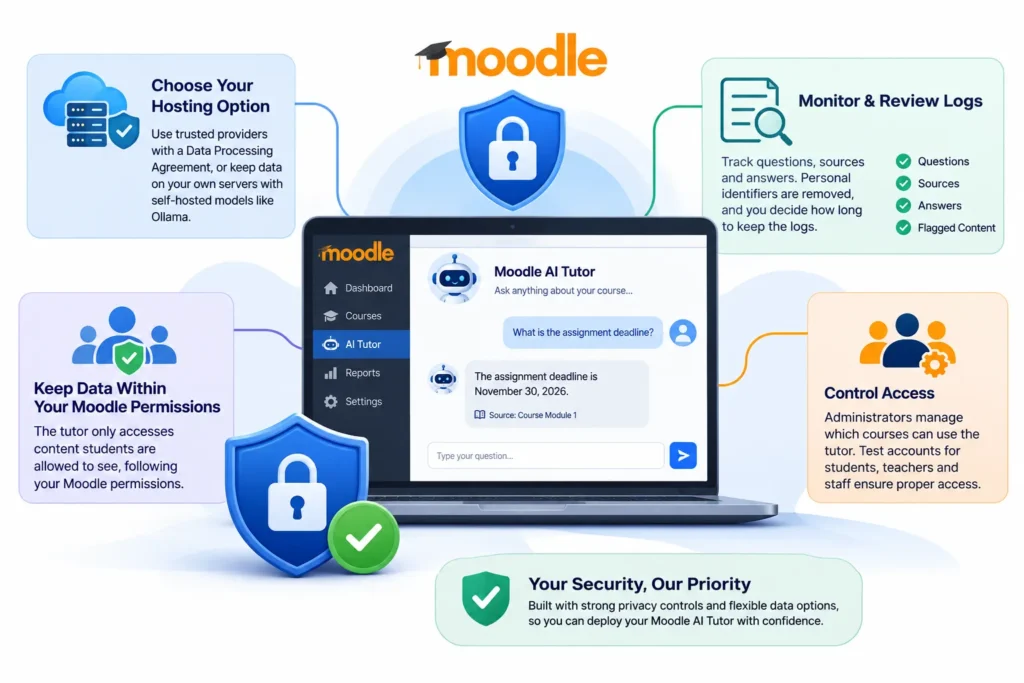
A chatbot inside a learning platform handles student questions, course content and, sometimes, personal details. Security and privacy need to be settled before the pilot starts, not added after launch. Our build keeps the tutor inside your Moodle permissions, so a student only receives answers drawn from material they are allowed to see.
You choose where the model runs. Hosted providers receive prompts under their own terms, and a data processing agreement can be put in place. Where data must stay on your infrastructure, self-hosted models such as Ollama keep processing on your side. The decision is made during scoping, based on your institution’s policies, not on what is easiest to build.
Logs help you check how the tutor behaves. We record each question, the sources used and the answer given, with personal identifiers removed before review. Your team can see which questions were refused, which were flagged for a person and where the tutor’s answers need better course content. Retention periods for these logs are agreed with you up front, and they can be shortened or deleted to match your policy.
Access to the system follows the same rules as the rest of your Moodle site. Administrators control which courses the tutor can use, and test accounts for each role are used before launch to confirm that students, teachers and staff only see what they should.
Security, Privacy and Data Control for Your Moodle AI Tutor
Moodle Built-in AI, Free Plugin or Custom Build: Which Do You Need?
Moodle has had a built-in AI subsystem since version 4.5, and free AI chat plugins exist. For many sites that is enough. A custom build makes sense when you need answers grounded in your own content, strict role rules, audit logs or a specific hosting setup.
What We Build for Moodle.
Four common builds. Most projects start with the first one, on a single course.
Grounded course tutor
Students get answers drawn only from their own course pages, files and resources, with a link to the source. If the course doesn’t cover it, the tutor says so.
Student support assistant
Handles routine questions about deadlines, submissions, policies and where to find things, and hands off to a person when it can’t answer.
Teacher assistant
Drafts quiz questions, summaries and feedback from the teacher’s own material. The teacher reviews before anything reaches learners.
How the Moodle AI Chatbot Works
A good tutor is not a model pasted into a chat box. The model only sees what the plugin hands it, and the plugin only hands it what the student may see.
The student asks inside Moodle
No separate login, no copying between tools.
The plugin checks who is asking
Retrieval finds the right passages.
Only content the student may see is searched.
Writes Answers
The model writes the answer from those passages, using the provider you chose.
Moodle AI Chatbot: Frequently Asked Questions
Straight answers on built-in AI versus custom builds, student data, accuracy, cost and ownership. Not on the list? Ask us on the scoping call.
Do we need a custom AI chatbot, or is Moodle’s built-in AI enough?
Moodle’s built-in AI (introduced in version 4.5) and free plugins cover basic needs such as text generation and simple help chat. A custom build makes sense when you need answers grounded in your own course content with sources, role-aware access, audit logs, a private model, or integration with other systems. We will tell you honestly which option fits.
Can the chatbot answer only from our course content, with sources?
Yes. We build the chatbot to retrieve answers from your approved course materials and cite where each answer came from. Anything outside that content can be refused or flagged as not source-based, so students are not given invented answers.
Does it respect student, teacher and course permissions?
It is designed to follow Moodle roles and course access, so a student only gets answers drawn from content they are allowed to see. We test this during the pilot with accounts for each role before any wider rollout.
Which AI models can you connect to Moodle?
Moodle’s AI subsystem works with provider plugins for OpenAI, Azure AI, Google Gemini, Anthropic Claude, Amazon Bedrock, DeepSeek and self-hosted models through Ollama, as well as OpenAI-compatible services. We help you choose based on cost, quality and your data requirements.
Where does student data go, and can we keep it on our own servers?
With a hosted model, prompts go to that provider under its terms. With a self-hosted model, processing stays on your own infrastructure. We explain what leaves your environment, set retention rules, and support a data processing agreement before launch. Your legal team makes the final compliance decision.
How do you stop wrong or off-topic answers?
We limit the bot to your course content, restrict topics, cap questions per student, and test it with real course questions before launch. Teachers can review anonymized question logs afterward, so problems are found and fixed early.
Can the bot grade work or flag at-risk students?
It can support teachers with draft feedback or flags, but we recommend a human reviews anything that affects grades or student decisions. Automated decisions without review carry accuracy and fairness risks, so we design these features with teacher approval built in.
How much does a Moodle AI chatbot cost to build and run each month?
Cost depends on the amount of course content, the number of users and messages, the AI model you choose, hosting, and any integrations. After a short scoping call we give a written estimate that separates the one-time build from monthly running costs, including model usage.
How long does a pilot take, and which Moodle versions do you support?
We usually start with a pilot on one course. Timing depends on your content volume and integrations, and you get a written plan after scoping. Share your Moodle version on the call so we can confirm compatibility before any work starts.
Who owns the code, and what happens if we change AI provider?
Code built for you is delivered with documentation, and ownership terms are written into the contract. We build the AI layer so the model provider can be swapped without redoing the whole project, which avoids lock-in.
Ready to Add a Grounded
AI Tutor to Your Moodle Site?
Tell us your Moodle version, your course content and what you want students to get. We will recommend built-in AI, a plugin or a custom build, and scope a pilot on one course.